

See BrandWizard in action
Learn how BrandWizard supports local visibility, consistency, and customer trust
See how businesses manage listings, reviews, and content across locations
Walk through the BrandWizard platform and its core feature
See how your brand appears locally!
Get a demo ✨

100+ multi-location businesses stand out in local search with us























What is a post in location-based services?
A post (publication) is a text-graphic block in your company's listings on Google or Facebook.
With posts, you can:
With posts, you can:
-
 Share promotions, announcements, and events right where customers search.
 - Highlight seasonal offers, new products, or limited-time deals.
- Drive actions such as calls, directions, bookings, or orders with a clear next step.
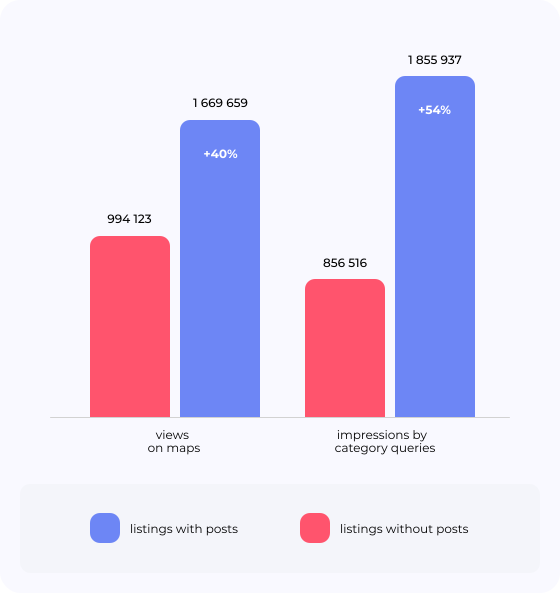
Consistent posting supports visibility and engagement
Regular posts help keep your listings fresh and encourage actions such as calls, route requests, and link clicks.
BrandWizard makes that cadence realistic for multi-location teams.
BrandWizard makes that cadence realistic for multi-location teams.
Posting is easy for one location. It breaks at 50
For multi-location teams, “just publish a post” turns into a repetitive process:
- Logging into multiple listings
- Losing consistency across the network
- Copying content location by location
- Missing timing for campaigns, events, and seasonal offers
BrandWizard Posts lets you publish and schedule content across locations from a single workflow.
How it works
1. Choose locations and channels
Start by naming your post, then select the locations you want to publish to. You can include the whole network or target specific branches, and choose the channels for publication, such as Google Business Profile or Facebook.


2. Create the post and preview it
Write the post text, upload an image, and use idea generation if you need a starting point. You also get a preview panel, so you can check how the post will look before it goes live.
3. Schedule and publish
Set the publishing date and time, add an optional removal date, and confirm the timezone. If you want the post to run on a cadence, choose the refresh frequency and number of repetitions. When everything is ready, send the post or save it as a draft.

Ready to publish local content at scale?
Book a demoWhat BrandWizard Posts help you achieve
-
Save team time
Create one post and publish it across locations instead of updating listings one by one. -
Publish promptly
Keep a steady posting cadence, even during busy periods, with scheduling and drafts. -
Keep a consistent brand voice
Make sure every location shares the same message, written in your tone, across the whole network. -
Support local performance
Regular, timely updates can help keep listings active and encourage actions from local customers.

Built for multi-location marketing teams
Posts work best when you:
-
 Manage many locations and want one consistent voice.
 - Need to publish faster without increasing headcount.
- Want a scalable system for local content, not one-off manual work.
- Want better campaign timing across locations, including weekends and peak periods.
Meet our clients
RETAIL • 61 LOCATIONS
Head partnered with BrandWizard to unify its listings across major platforms, improve customer engagement, and build a more trustworthy local footprint.
HEALTHCARE • 59 LOCATIONS
Synevo partnered with BrandWizard to verify and optimize its Google Business Profiles, bring consistency across locations, and build a structured approach to reviews and local SEO.
HORECA • 25 LOCATIONS
Hornitos partnered with BrandWizard to optimize and verify its listings, build a more efficient review workflow, and create a consistent local presence across platforms.
Explore BrandWizard tools
Monthly analytical report on the status of your company's online presence
Collect reviews from popular digital services, receive notifications of new ones and respond to them from a single account
A detailed analysis of your company's reputation so that you can identify the strengths and weaknesses of both yours and your competitors
See BrandWizard in action
Learn how BrandWizard supports local visibility, consistency, and customer trust
See how businesses manage listings, reviews, and content across locations
Walk through the BrandWizard platform and its core feature
See how your brand appears locally!
Get a demo ✨